


HoneyBook - Small Business CRM
4.4387.00 Reviews
App Specs
- Version
- 1.72.2
- Updated On
- License
- Free
- Downloads
- 100,000+
- Developer
- HoneyBook Inc
- Categories
- Business
- Platform
- Android
Screenshots




 Analysis by AppCompare
When client work, paperwork, and payment follow-ups compete for attention, the difficult part is often not any single task but keeping each one connected to the right project. That is the problem HoneyBook is meant to address. I see it as a business app for freelancers and small teams who want client communication and routine administration to feel less scattered, rather than as a general-purpose office suite.
Readable screens and a clear route through work
In my experience, the most useful design choice is the focus on projects. Instead of treating a client conversation, a document, and a payment as unrelated errands, the app gives them a shared business context. That can make it easier to work out what needs attention next, especially when several jobs are active at once. HoneyBook Inc developed the app, and its business focus is apparent: it is built around managing client relationships and the work attached to them.
A dashboard can help reduce the mental effort of remembering where every project stands, but it is not a substitute for deciding what is urgent. I would make a habit of reviewing active work at the start of the day and checking that each project has a clear next step. This small routine matters because an organized screen is only useful when its information reflects the way you actually run your business.
The app’s audience is broad in age terms: its content rating is Everyone. That says something about the material users may encounter, not whether the workflow will suit every person or business. The more important question is whether a client-based process fits your work. If your day revolves around individual projects, bookings, proposals, or invoices, the structure is easier to understand than it would be for a business that mainly tracks stock, shift schedules, or internal operations.
Using automation without losing the personal touch
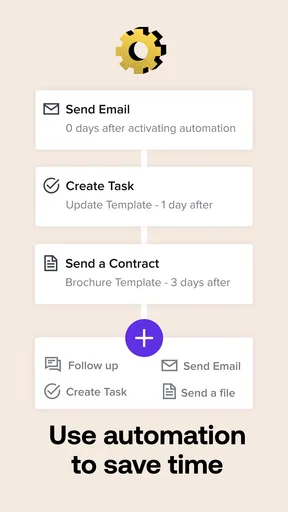
Automated reminders and follow-up messages can be valuable when a task is predictable, such as prompting a client about an outstanding step. I would start with one recurring message rather than automating every touchpoint at once. That gives you a chance to check that the timing and wording feel appropriate for your clients. A reminder that saves you from chasing routine paperwork is helpful; a message sent at the wrong moment can make a good client relationship feel impersonal.
The client portal also changes how I would handle a project from the first exchange onward. Rather than sending separate messages that ask a client to locate a contract, invoice, or timeline, I would direct them to the shared project space and keep later updates tied to the same job. The benefit is not merely fewer emails: it gives both sides a clearer reference point when details need checking. For a business with repeat clients, that shared record can be especially useful when a new request comes in and you need to distinguish it from unfinished work.
Integrations with QuickBooks, Google Calendar, and Zapier can help connect existing routines, but they are not automatically a reason to move every process into the app. Before relying on a connection, I would map one real workflow from inquiry to completed payment and note where information must be entered or checked. That makes it easier to see whether the integration removes duplicate effort or simply adds another place to troubleshoot. If your current tools already work smoothly, a gradual transition is safer than changing everything at once.
Worth Reading Before You Choose

EA SPORTS FC Mobile 26 Is a Bigger Football Game, but It Takes Time

Flipboard Shows What News Apps Must Do Beyond the Feed

Switching to Android Auto Means Rethinking Your Driving Routine

Google Calendar Makes a Crowded Week Easier to Manage

Ludo King Makes the Most of the Minutes Between Plans

Baby Panda World Brings Quick Play to Modern Phones, but Its Game Library Feels Busy
Accessibility in everyday business situations
The straightforward navigation described above is a practical advantage for users who prefer a less crowded interface. Still, ease of use is personal: someone who finds a dashboard intuitive may have a different experience from a user who needs larger text, more contrast, or a specific assistive setup. I would test the key tasks that matter to you—opening a project, locating a client message, and reviewing an invoice—on your own device before making the app central to your workflow.
There is also a motor and sensory side to business software. Client administration often happens in short bursts, and an app can be helpful when you need to check a detail away from your desk. But tapping through financial or contractual steps while distracted, commuting, or dealing with interruptions can raise the chance of mistakes. I would use mobile access for reviewing and simple follow-ups, then handle documents or payment details in a calmer setting when accuracy matters most.
For people who cannot comfortably complete a task on a phone, keeping a desktop workflow available is sensible. The app is available on Android and iOS, and the service is also described as usable across devices, but I would not assume that every screen or interaction feels identical on every device. A larger display may be preferable for reviewing a proposal, while a phone may be enough to check a project status between appointments. The best setup is the one that lets you complete essential tasks reliably, not the one that puts every task on a smaller screen.
Where a focused CRM may not be enough
HoneyBook is not the obvious choice for every small business. If you mainly need a simple way to issue occasional invoices, a dedicated invoicing tool may be easier to learn and maintain. If your central challenge is inventory, point-of-sale work, staff scheduling, or complex accounting, a specialist product is likely to provide a better fit. A client-management system is most worthwhile when the cost of scattered project details is a real, recurring problem.
There is also a learning trade-off in bringing several parts of client work into one system. You need to set up projects and decide how you want templates and follow-ups to work before the organization pays off. A small business with only a few clients may find that email and a basic calendar are enough. I would compare the time spent setting up and maintaining a new workflow with the time currently lost to searching, re-entering details, or chasing the same information.
Getting to Know HoneyBook
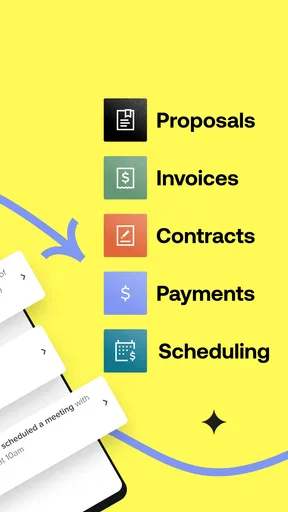
HoneyBook is a customer relationship management (CRM) tool designed specifically for small businesses. Think of it as your personal assistant, helping you manage projects, book clients, send invoices, and even get paid. The app is available on both Android and iOS, which is great for those of us who switch between devices.
User Interface and Experience
Let's talk about the user interface first. It’s clean, intuitive, and doesn't overwhelm you with too many options. From the moment I opened the app, I was greeted with a dashboard that neatly organizes all my ongoing projects. It’s like having a to-do list that actually makes you want to get things done.
The navigation is straightforward. Everything you need is just a tap away, whether it's checking client messages or looking at your calendar. I especially appreciated the consistent design across platforms, making it easy to switch between my phone and tablet without a hitch.
Features That Stand Out
One thing that really caught my eye was the automation features. HoneyBook allows you to automate tasks like payment reminders and follow-up emails. This is a game-changer for someone like me who tends to forget these little yet crucial tasks.
Another feature worth mentioning is the client portal. It allows your clients to access their invoices, contracts, and project timelines in one place. This not only enhances professionalism but also cuts down on the back-and-forth emails.
And the cherry on top? The app integrates smoothly with other tools like QuickBooks, Google Calendar, and Zapier. This means you can keep your entire business ecosystem connected and running like a well-oiled machine.
Why It’s a Must-Have for Small Businesses
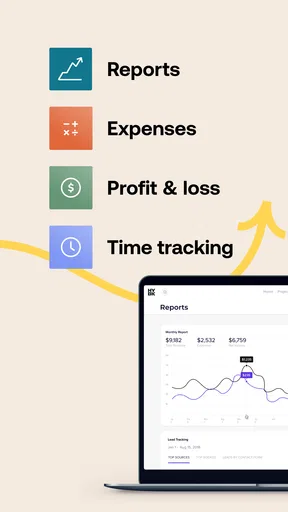
For small business owners, time is money. HoneyBook helps save both by streamlining processes that would otherwise take multiple apps or manual effort. With everything in one place, you can focus more on growing your business and less on administrative tasks.
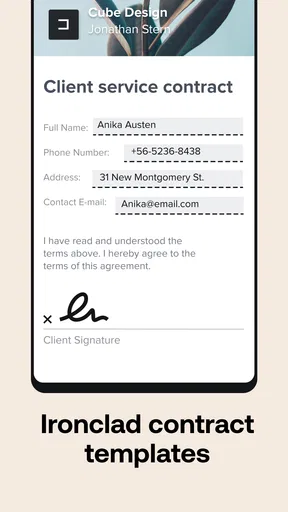
Plus, the app offers templates for contracts and proposals, which is a blessing if you're not a legal expert. You can customize them to fit your business needs, ensuring you always put your best foot forward.
Choosing a workflow that stays inclusive
In a realistic workday, I might finish a client call while heading to another appointment, then need to remember a proposal detail before the next meeting. I would use the phone to check the project and note what needs attention, but leave careful contract edits for when I can sit down and review the wording. That division keeps mobile access useful without forcing every task into a rushed, small-screen interaction.
For a solo photographer, designer, consultant, or event professional, the appeal is having project details and client-facing steps gathered together. A client can refer back to shared documents instead of asking for the same attachment again, while I can use a repeatable template as a starting point for the next similar job. The important trade-off is to personalize each proposal and contract: reusable wording can save time, but it should not make a client’s particular needs disappear.
Compared with a spreadsheet, email folders, and separate calendar reminders, this kind of CRM offers a more connected view of a client’s journey. That convenience comes with more setup and a workflow to learn. Compared with a specialist accounting or inventory system, it is oriented toward client projects rather than the full operational picture of every kind of business. I would choose it to organize service work, not as a replacement for a tool whose core job is bookkeeping or stock control.
The app is free to download, with in-app purchases ranging from about $36 to $590 per item. I would check the available plan and purchase terms against the features I actually expect to use before moving client processes over. Its average rating is 4.6 from around 2,200 ratings, with 375 written reviews, and it has over 100,000 installs. Those figures suggest that it has found an audience, but they cannot tell me whether its workflow matches a particular business; a short trial with one real project is a more useful test.
HoneyBook was released on January 29, 2019, and the current version is 1.59.6, with Android 8.0 or later required. I would check compatibility on the device I plan to use, especially if it is older, and keep an alternative way to access essential client information until I know the app fits my routine. That is a sensible precaution for any business tool that holds work I need to reach on a deadline.
Final Thoughts
So, is HoneyBook worth the hype? Absolutely. It's like having an extra pair of hands that never tires. Whether you're a freelancer, a creative professional, or running a small enterprise, this tool can significantly boost your efficiency. While no app is perfect, the benefits here clearly outweigh any minor glitches I encountered.
In a nutshell, HoneyBook is more than just a CRM; it's a comprehensive business management tool that can transform how you operate. Give it a try, and you might just find yourself wondering how you ever managed without it.
My recommendation is strongest when you handle several ongoing client projects and value a shared path from booking through payment. I would be more cautious if you need a very lightweight invoice sender, if your work depends on specialist operational software, or if phone-based navigation does not suit your access needs. In that case, compare the desktop experience and your existing tools before committing to a new routine. The app’s promise is not that every part of running a business becomes effortless; it is that familiar client tasks can be easier to keep together. For the right service business, that can make a noticeable difference to a busy week.
Pros
- User-friendly interface
- easy to navigate.
- Customizable templates for quick setup.
- Integrated invoicing and payments feature.
- Automated workflows save time.
- Excellent customer support available.
Cons
- Limited free trial period.
- Mobile app lacks some desktop features.
- No phone support
- chat only.
- Higher cost compared to competitors.
- Steep learning curve for beginners.
FAQs for HoneyBook - Small Business CRM
What features does HoneyBook offer for managing my business?
HoneyBook provides a comprehensive suite of tools designed to streamline business management for small enterprises. Key features include project management, client communication, invoicing, scheduling, and payment processing. The platform is particularly tailored for creative professionals, offering customizable templates and automation to enhance productivity and client interaction.
Is HoneyBook suitable for all types of small businesses?
While HoneyBook is exceptionally beneficial for creative professionals such as photographers, event planners, and designers, it can serve a variety of small business needs. Its versatility in managing client relationships and project workflows makes it adaptable to different industries. However, businesses with very niche or complex needs might find some limitations.
How user-friendly is HoneyBook for beginners?
HoneyBook is designed with a user-friendly interface that simplifies navigation for beginners. The intuitive layout, along with tutorials and customer support, aids new users in quickly becoming familiar with its features. However, as with any comprehensive CRM, a learning curve might exist for those entirely new to CRM software.
What are the pricing options for HoneyBook?
HoneyBook offers a subscription-based pricing model, with options to pay monthly or annually. The pricing includes all features with no additional costs, making it straightforward for budget planning. A free trial is available to explore the platform before committing, allowing users to assess its fit for their business needs.
Does HoneyBook offer integration with other tools and platforms?
Yes, HoneyBook supports integrations with various tools and platforms, enhancing its functionality. It connects with popular applications like QuickBooks, Google Calendar, and Zapier, which helps in syncing data and automating workflows. These integrations are crucial for users looking to maintain seamless operations across different systems.


